
Download BackupEXPRO – Simple, Secure Backup Tool for Windows, Mac, Android & iOS
Overview
BackupEXPRO is a lightweight, single‑click backup utility designed for users who want a “set‑it‑and‑forget‑it” solution. The program focuses on three core steps: selecting the type of data you wish to protect (program files, documents, media, etc.), creating a profile that defines how often the backup runs (daily, weekly, or monthly), and choosing a destination folder where the copies will be stored. Once these parameters are saved, the software operates quietly in the background, performing incremental backups without demanding any further interaction.
What sets BackupEXPRO apart from more complex backup suites is its intentional simplicity. The interface is stripped down to the essentials, making it perfect for beginners or anyone who finds traditional backup managers overwhelming. While power users might miss granular control over file formats and compression levels, the trade‑off is a reliable safety net that never forgets to back up your critical files. The tool also supports multiple profiles, so you can maintain separate backup schedules for work documents, personal photos, or gaming installations—all from the same dashboard.
In an age where data loss can happen in a split second—whether due to hardware failure, ransomware, or accidental deletion—having a trustworthy backup solution is non‑negotiable. BackupEXPRO delivers that peace of mind while staying unobtrusive, secure, and free of hidden fees. Whether you run a home office on Windows 10, a design studio on macOS, or a mobile workflow on Android or iOS, the software promises a consistent experience across platforms.
Key Features & How It Works
- One‑click backup initiation after initial setup.
- Three backup types: program files, documents, and media (video/audio).
- Customizable profiles for daily, weekly, or monthly schedules.
- Incremental backup engine that only copies changed data, saving space.
- Multiple profile support for different data categories.
- Background operation with minimal system impact.
- Secure storage with optional encryption for sensitive files.
- Cross‑platform compatibility (Windows, macOS, Android, iOS).
- Automatic error logging and email notifications (optional).
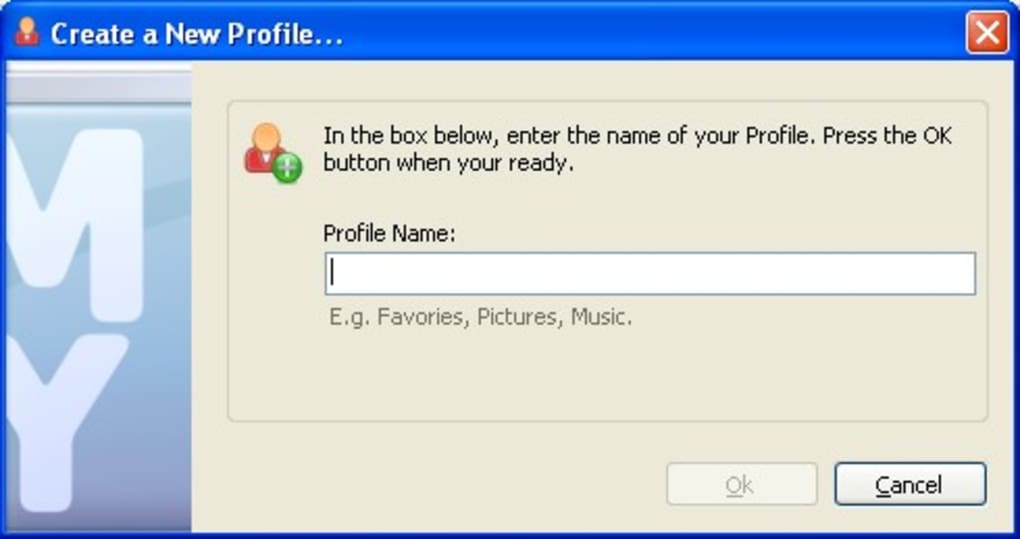
The workflow starts with a wizard that walks you through the three configuration steps. First, you pick the data category—whether it’s a program’s installation folder, a folder of personal documents, or a directory containing video files. The second step asks you to define a profile name and set the backup frequency. You can create as many profiles as needed, each with its own schedule, so you might have a “Work Documents” profile that runs nightly and a “Family Photos” profile that backs up weekly.
The third step is the destination selection. BackupEXPRO supports local drives, external USB storage, network shares, and cloud‑mounted folders (such as OneDrive or Google Drive). Once you confirm the path, the software writes a tiny configuration file to your system, and the backup engine takes over. From that point forward, the program checks the source folders at the defined intervals, compares file timestamps and sizes, and copies only the new or modified files. This incremental approach dramatically reduces both backup time and storage consumption.
For users who demand extra security, the application includes an optional AES‑256 encryption toggle. When enabled, each backup set is encrypted before it leaves your machine, ensuring that even if the destination drive is lost or stolen, the data remains unreadable without the key you set during profile creation. Additionally, BackupEXPRO logs each backup event, providing a transparent audit trail that can be exported for compliance or personal records.
Installation, Usage & Compatibility
Step‑by‑Step Installation
1. Download the installer: Visit the official BackupEXPRO website and click the “Download for Windows/macOS/Android/iOS” button. The file size is under 10 MB, making the download quick even on slower connections.
2. Run the installer: On Windows, double‑click the .exe file; macOS users open the .dmg and drag the app to the Applications folder; Android users open the .apk (enable “Install unknown apps” if necessary); iOS users download the app directly from the App Store.
3.
Accept the license agreement: The simple EULA outlines data handling and the optional encryption feature.
4. Complete the setup wizard: After installation, the application launches a welcome screen that guides you through the three‑step profile creation described earlier.
5. Finalize configuration: Choose your backup destination, enable notifications if desired, and hit “Finish.” BackupEXPRO will now run as a background service.
Using BackupEXPRO Day‑to‑Day
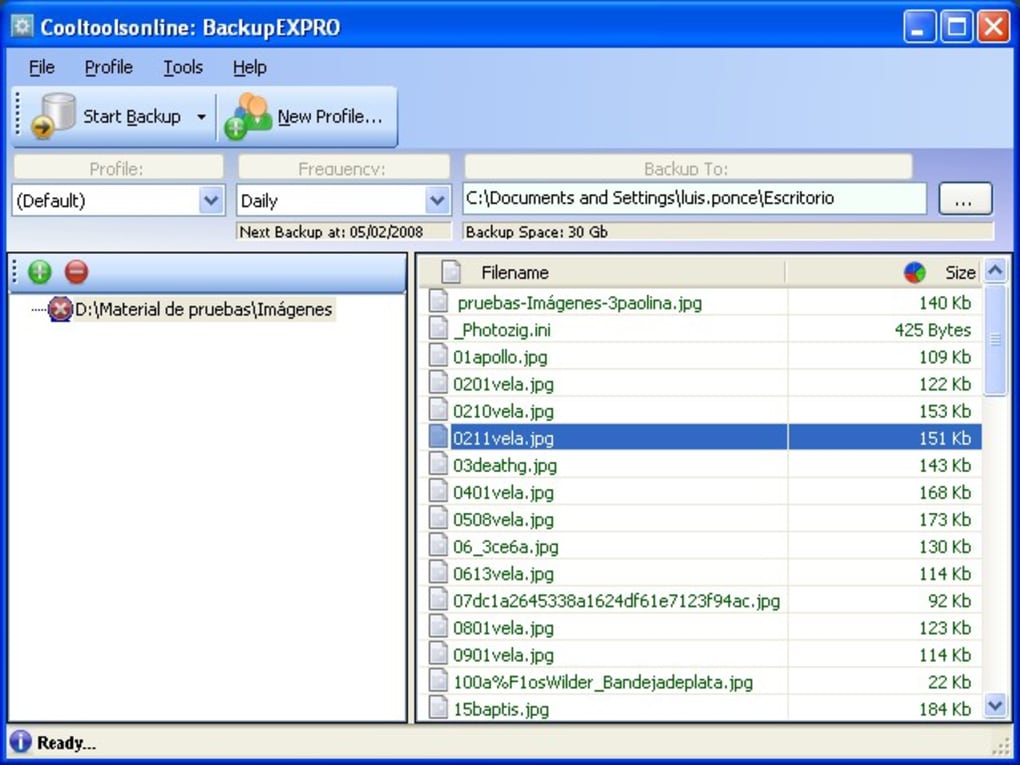
Once a profile is active, you rarely need to interact with the program again. The main dashboard displays the next scheduled run for each profile, the amount of data backed up so far, and any alerts (e.g., destination unavailable). If you need to trigger an immediate backup, simply click the “Backup Now” button next to the relevant profile. The incremental engine will immediately scan the source folder, copy changed files, and update the log. You can also pause a profile, edit its schedule, or delete it entirely from the settings menu.
Operating System Support
BackupEXPRO is built to run on the latest versions of the major operating systems:
- Windows 10, Windows 11 (64‑bit)
- macOS 12 Monterey and newer (Intel & Apple Silicon)
- Android 9 Pie and newer
- iOS 14 and newer (iPadOS included)
System requirements are modest: a minimum of 2 GB RAM, 100 MB of free disk space for the program itself, and write access to the chosen backup destination. Because the software uses incremental copying, it does not strain CPU or network bandwidth—ideal for laptops on battery power or machines that need to stay responsive during work hours.
Pros, Cons, FAQ & Conclusion
Pros
- Extremely easy to set up—no technical expertise required.
- One‑click backups after initial configuration.
- Supports multiple profiles for different data sets.
- Incremental backups save time and storage space.
- Cross‑platform availability (Windows, macOS, Android, iOS).
- Optional AES‑256 encryption for added security.
- Runs silently in the background with minimal resource usage.
Cons
- Lacks advanced options such as compression levels, file‑type filters, or versioning.
- No built‑in cloud storage; relies on external drives or mounted cloud folders.
- Limited reporting—only basic logs and email notifications.
- Not suited for enterprise environments that need granular policy controls.
Frequently Asked Questions
Is BackupEXPRO really free?
Yes, the core application is free for personal use on all supported platforms. A premium add‑on is available for business users who need centralized management.
Can I back up to cloud services like Google Drive?
BackupEXPRO can write to any folder that appears as a mounted drive on your system, including Google Drive, OneDrive, or Dropbox. The software itself does not include a native cloud client.
How does incremental backup work?
During each scheduled run, the program compares timestamps and file sizes of source files against the last backup. Only files that have changed are copied, which reduces both time and storage consumption.
Is my data encrypted during backup?
Encryption is optional. When you enable AES‑256 encryption in a profile, every file is encrypted before it leaves your computer. The encryption key is stored locally and never transmitted.
Can I restore individual files or whole backups?
Yes. The restore wizard lets you browse the backup folder, select individual files, or recover an entire profile snapshot with a single click.
Conclusion & Call to Action
BackupEXPRO delivers on its promise of a “set‑it‑and‑forget‑it” backup experience. Its minimalistic design eliminates the learning curve that typically comes with full‑featured backup suites, making it an excellent choice for home users, students, and small businesses that need a reliable safety net without the overhead of complex configuration. While power users may crave more granular controls, the trade‑off for simplicity, low resource consumption, and cross‑platform availability is compelling.
If you’re ready to protect your programs, documents, and media with a tool that runs silently in the background, click the download button below. Install BackupEXPRO in minutes, set up your first profile, and enjoy peace of mind knowing your data is safely backed up on a schedule you control.







